ACCOUNT PLANNING · B2B AGENCIES
Mutual Action Plan Template for Client Accounts
A mutual action plan template for client accounts: one shared plan with an owner and a date for every step, for pilots, renewals, expansions and onboarding.
How many of your client plans does the client actually see?
If the answer is "none", you have a plan. You don't have a mutual one. :)
A mutual action plan (MAP) puts your steps and the client's steps on one page. Each step has one owner and one date. It's the simplest tool I know for pilots, renewals, expansions and onboarding. Not because it's clever. Because it makes invisible work visible: the access that never arrives, the approval nobody owns, the decision date that nobody agreed.
This guide shows what a MAP is, the template, four ready-made versions (pilot, renewal, expansion, onboarding), the rules that make it work, and how to send it without sounding like a project manager. We built a software agency from zero to 110 people and exited. The accounts that went wrong were rarely about the work itself. They were about who was supposed to do what, and by when.
What is a mutual action plan?
Salesforce describes a mutual action plan as a document shared between the seller and the buyer to set expectations throughout every stage of a sales cycle. It says the plan is sometimes called a mutual close plan, mutual success plan or joint execution plan (Salesforce, "Mutual action plan", published 12 April 2024, retrieved 5 November 2026).
That definition is about winning new deals. The idea works even better with a client you already serve, because you already have trust to build on. A MAP for an existing client covers the steps toward one agreed outcome: a pilot decision, a signed renewal, a new scope, a finished onboarding.
Salesforce also notes that successful plans reverse-engineer a target goal into milestones, which are then broken down into outcomes and deliverables. And it suggests that a slipped date or forgotten deliverable should read as a roadblock to the client's own goals, not as an admin problem on your side (Salesforce, as above).
Rule of thumb: if only your team sees the plan, it's an internal plan.
Takeaway: a MAP is one page that both sides own.
MAP vs account plan vs project plan
They're often mixed up. They answer different questions.
| Account plan | Project plan | Mutual action plan | |
|---|---|---|---|
| Who sees it | Your team | Delivery team, sometimes the client | You and the client |
| What it covers | The whole relationship and its goals | The work inside one project | The steps toward one agreed outcome |
| Includes client's steps? | Rarely | Sometimes | Always |
| Typical length | A page or two, reviewed quarterly | Weeks or months | 4 to 12 weeks |
Your account plan tells you which MAPs to create. Our account plan template is the quickest way to start one.
Takeaway: the account plan sets the goal. The MAP gets you to a decision.
Want help putting this into practice? See how we can help
When to use a MAP with an existing client
Use one when there are several steps on the client's side. Skip it for a simple monthly retainer.
- Pilot: access, owners and a decision date all sit with the client.
- Renewal: approvals, budget and signatures involve more than your contact.
- Expansion: a new team, a new budget owner, a new approval route.
- Onboarding: data, access, introductions and a first review.
Our proposal template for consulting services shows how to propose the pilot or expansion first. The MAP is what you send once they say yes.
Takeaway: the more steps on their side, the more you need one.
Proposal Template for Consulting Services: Pilot, Expansion, Renewal ↗
The mutual action plan template
Copy this into a doc or a spreadsheet. One row per step. Every row needs an owner and a date.
COPY & ADAPT
Mutual action plan: [Client] - [Pilot / Renewal / Expansion / Onboarding]
Goal: [one line, in the client's words]
Start: [date]   Decision date: [date]

# | Step | Owner | Due | Done when | Status
1 | [step] | [name, our side] | [date] | [what done looks like] | [open]
2 | [step] | [name, client side] | [date] | [what done looks like] | [open]
...
Last row: Decision meeting | [client sponsor] | [decision date] | Continue, adjust or stop is recorded | [open]
Five columns do the work.
- Step: one verb, one thing. "Share access to the ad account", not "Prepare".
- Owner: a name. "The client" is owned by nobody.
- Due: a date, not "next week".
- Done when: the check. "Access tested by our team."
- Status: open, done, late or changed.
Takeaway: a name, a date and a "done when" for every step.
Four ready-made versions
Work backwards from the decision date. These are starting points. Adjust them to the client and the contract.
| Week | Step | Owner | Done when |
|---|---|---|---|
| 0 | Agree scope, success measures and the exit rule | Our lead | Both sides reply "agreed" to one page |
| 1 | Name the pilot owner and sponsor on each side | Client sponsor | Two names confirmed |
| 1 | Share access and data | Client owner | Access tested by us |
| 2 | Kickoff call: goal, cadence, how we judge success | Our lead | Notes sent within 24 hours |
| 5 | First checkpoint against the success measures | Our lead | One-page update shared |
| 7 | Client feedback: what works, what doesn't | Client owner | Feedback received |
| 9 | Mid-way review and adjust the plan | Our lead | Changes agreed and recorded |
| 11 | Results summary against the agreed measures | Our lead | Sent before the decision meeting |
| 12 | Decision meeting: continue, adjust or stop | Client sponsor | Choice and next step recorded |
For a renewal, start 120 days before the end date. Day 120: results review with the sponsor. Day 90: share the proposal. Day 60: meet the person who signs the budget. Day 30: paperwork only. The last 30 days are for signing, not persuading.
For an expansion, the order is: describe the opportunity in the client's words, confirm who decides and who pays, share a short proposal, walk through it with the people who'd use the result, answer questions, get approval, agree the start date.
For an onboarding, the order is: kickoff, access and materials, a stakeholder map completed with the client, a first deliverable for feedback, a feedback checkpoint on how you work together, a first results review. Our guide to B2B client onboarding covers the first 90 days.
The free Mutual action plan builder generates all four with dates, owners and a cover email.
Takeaway: same page, different steps.
B2B client onboarding: a practical first-90-days checklist ↗
Six rules that make a MAP work
These are my rules of thumb, based on the principles in Armiqo's account management playbook.
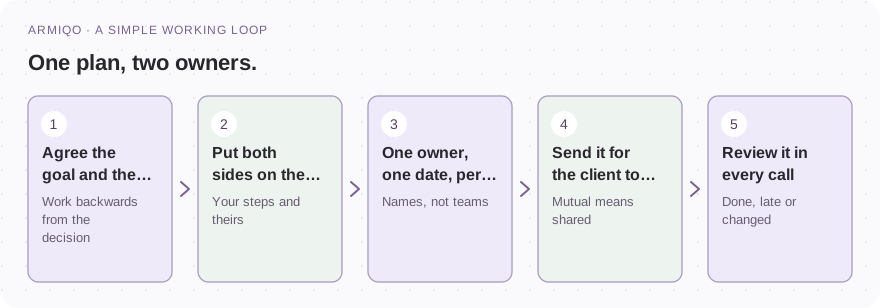
- One owner per step. Two owners is none.
- One date per step. Move it only with the other side's agreement.
- Start from the decision date. Count backwards.
- Put the client's steps on the page. Access, approvals, introductions.
- Write "done when". Otherwise "done" is an opinion.
- Keep it to one page. If it needs scrolling, it's two plans.
Remember: every touchpoint has a purpose, an owner and a date. "Stay in touch" is not a plan. "Sponsor check-in on 14 March, owner Anna, goal: agree Q2 priorities" is.
Takeaway: if a step has no name or date, it won't happen.
How to send it without sounding like a project manager
Don't send a spreadsheet with no context. Send a short email and ask them to edit it.
COPY & ADAPT
Subject: Shared plan for [project]: please check owners and dates

Hi [Name],

Here's the shared plan we discussed. It runs from [start] to [decision date] and ends with
[the decision].

Could you check the steps on your side and tell me which dates don't work?
Once we both agree, I'll treat this as the plan and flag early if anything slips.

Best,
[Your name]
Two details matter. You asked them to edit, which makes it theirs. And you promised to flag early, which makes you the one who raises problems first. Bad news early, with a plan, is always better than a surprise.
If you only know one person at the client, the plan will expose it. The steps on their side need owners, and one contact can't own them all. Our guide to single-threaded accounts shows how to widen the relationship.
Takeaway: ask them to edit it. That's what makes it mutual.
How to review it
Put the plan on the agenda of every call that touches it. Our client meeting agenda has a 30-minute structure.
Three questions, in this order.
- Which steps are done?
- Which are late, and why?
- Which dates need to change, and who agrees?
Mark each step done, late or changed. Update the plan the same day. If a client-side step is late twice, raise it with your sponsor. That's the early warning you wanted.
Takeaway: review it in every call, and fix it the same day.
Use AI to draft the first version
AI is great at structure. It can't know your client's approvals, so you fill those in. Always check the dates.
COPY & ADAPT
You are an account manager creating a mutual action plan (MAP) for a client.
Purpose: [pilot / renewal / expansion / onboarding]. Client and decision maker: [name, role].
Our team: [names, roles]. Goal and success criteria agreed so far: [list].
Target decision date: [date]. Known steps and dependencies: [approvals, access, data, budget].
Produce a table: step | owner (client or us, by name) | due date | done when | status.
Work backwards from the decision date. Include kickoff, access, checkpoints, a mid-way review,
the decision meeting and what happens after. Add the three biggest risks to the timeline and
a short email that sends the plan and asks the client to confirm owners and dates.
Every step has exactly one owner and one date. Mark guesses as "Proposed". Do not invent commitments.
The same prompt is on the Mutual action plan builder page, ready to copy or download as a Markdown file.
Takeaway: AI drafts the plan. You and the client confirm the dates.
Where a MAP fits into B2B key account management
In B2B key account management, a MAP is how a goal in the account plan becomes a set of dated steps. The account plan says "renew and expand". The MAP says who does what by when.
Use it for the moments that matter most: a pilot, a renewal, a new team. Link it to your stakeholder map, because every client-side step needs a real person. And link it to your QBR: the review is a natural place to agree the next MAP. Our stakeholder map method shows how to find the people, and our guide to client follow-up emails helps when a client-side step goes quiet.
Takeaway: the account plan sets the goal. The MAP makes it happen.
Common mistakes
Most of these are quick to fix before you send or ask for anything.
- Keeping the plan inside your team.
- Writing "the client" as the owner.
- Using "next week" instead of a date.
- Skipping the client's steps.
- Leaving out "done when".
- Not agreeing the decision date at the start.
- Letting the plan go stale between calls.
- Making it two pages long.
Your next step
Pick one account with a decision coming up. Write the decision date. Count backwards, and list the steps on both sides. Give each step a name and a date.
Then send it, and ask them to edit it.
Which client's plan would change the most if they saw it? :)
Start with one account this week
- Choose the account and the outcome: pilot, renewal, expansion or onboarding.
- Agree the decision date.
- List the steps on both sides, working backwards.
- Give each step one owner and one date.
- Add a "done when" for every step.
- Put the client's steps next to yours.
- Send it for the client to edit, with a short email.
- Review it in every call: done, late or changed.
- Raise a late client-side step with your sponsor.
- Keep it to one page.
Common questions
What is a mutual action plan template?
A table with the steps, one owner per step, a due date and what "done" looks like, covering both your team and the client. It's built backwards from an agreed decision date.
How is a mutual action plan different from an account plan?
An account plan is your internal view of the whole relationship. A mutual action plan is shared with the client and covers the steps toward one outcome, such as a renewal or a pilot decision.
Who should own the client-side steps?
A named person: your sponsor for approvals, your day-to-day contact for access and data. A step owned by "the client" is owned by nobody.
How often should we review it?
In every call that touches the project, and at least weekly during a pilot. Mark each step done, late or changed, and update it the same day.
Do I need a MAP for every client?
No. Use one when there are several steps on the client's side, like a pilot, a renewal, an expansion or an onboarding. A simple monthly retainer doesn't need one.