PROPOSALS · B2B AGENCIES
AI Proposal Generator: A Prompt That Writes Proposals You Can Send
An AI proposal generator you can use today: a fact sheet, a copy-ready prompt, a review checklist and what AI must never invent, for proposals to existing clients.
Be honest: have you ever pasted "write me a proposal for a client" into ChatGPT and sent whatever came back? :)
No judgment. The output looks great. It's fluent, confident and nicely formatted. And it's quietly wrong in three places.
This guide shows how to use an AI proposal generator without that risk. You get a one-page fact sheet, a copy-ready prompt, a review checklist, a table of what AI is good and bad at, and a worked example. It's written for proposals to clients you already work with: a pilot, an expansion or a renewal. We built a software agency from zero to 110 people and exited, and the proposals that worked were never the longest ones. They were the ones with the right facts.
What is an AI proposal generator?
An AI proposal generator is any tool that uses a language model to draft a proposal from the information you give it. It can be a dedicated proposal app, a general assistant like ChatGPT, Claude or Gemini, or a free generator on a website.
Search for the term and you'll find mostly proposal software for new business and templates for freelancers. That's a different job from yours. A proposal to a client you already work with is shorter, more personal and built on a history. The AI needs to know that history, or it will invent one.
So the question isn't "which tool?" It's "what do I feed it, and how do I check what comes out?"
Rule of thumb: the facts >> the tool.
Takeaway: the tool matters less than what you feed it.
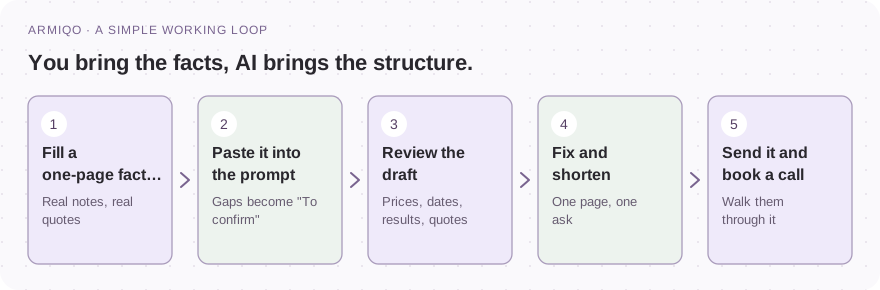
Why AI proposals go wrong
Salesforce's guide to anti-hallucination practices (published 12 August 2026) describes a hallucination as an output that appears fluent and authoritative but is factually wrong, misleading or impossible to verify. It says they rarely announce themselves, and that they arrive polished and composed (Salesforce, "How to Make AI a Trusted Business Partner With Anti-Hallucination Practices", retrieved 5 November 2026).
That's exactly the risk in a client proposal. A wrong price, an invented result or a quote the client never said can cost you the relationship.
The same guide recommends requiring claims to be tied to a named source and treating any claim that can't be traced as unreliable. It also says you don't need to verify every sentence: checking the most consequential numbers, names or recommendations is often enough to tell you whether an answer is grounded. And it states that human judgment and AI support are both necessary (Salesforce, as above).
Here's how that applies to a proposal.
| AI is good at | AI will make up if you let it |
|---|---|
| Structure: eight clear parts | Results the client never confirmed |
| Plain, short wording | Prices, dates and payment terms |
| Turning notes into bullets | Quotes from the client |
| Spotting what's missing | The client's goals and priorities |
| A cover email in your tone | Promises you can't keep |
Takeaway: use AI for the shape, never for the facts.
Want help putting this into practice? See how we can help
Step 1: the one-page fact sheet
Before you open any AI tool, write the facts down. This is the real work. If you can't fill a line, that's information too: it means you're not ready to send.
COPY & ADAPT
FACT SHEET
Proposal type: [pilot / expansion / renewal / new scope]
Client and decision maker: [name, role]
Results the client confirmed, with dates: [list]
The problem or goal, in their own words: [real quotes from calls or emails]
What we propose: [scope in plain language]
Not included: [list]
Timeline: [start, checkpoint, end]
Price and payment terms: [amount, what it covers, when invoiced]
How we will judge success: [2-3 checkable measures]
What happens at the end: [continue, adjust or stop]
What we need from the client: [owners, access, approvals, dates]
Two lines matter most. "Results the client confirmed" keeps AI from inventing proof. "In their own words" keeps it from inventing the problem.
No quote yet? Go back to your last two calls. Our proposal template for consulting services explains why that one line is the most valuable in the whole document.
Takeaway: if you can't fill the fact sheet, you're not ready to send.
Proposal Template for Consulting Services: Pilot, Expansion, Renewal ↗
Step 2: the prompt
Copy this prompt. Paste your fact sheet under it.
COPY & ADAPT
You write proposals for a B2B agency or consultancy that sells to existing clients.
Write a clear, short proposal from the fact sheet below.
Structure: 1) Why now (3 sentences, using the client's own words). 2) What we will do.
3) What you get and what is not included. 4) Plan and timeline. 5) Investment.
6) How we will measure success and decide the next step together. 7) What we need from you.
8) Next step with a date.
Rules: maximum 700 words, no jargon, no filler. Never invent results, numbers, dates,
prices or quotes. Use only the fact sheet. Mark anything missing as "To confirm" and list
the open questions at the end. Add a one-paragraph cover email.
FACT SHEET: [paste]
The same prompt, ready to copy or download as a Markdown file, is on the free Client proposal generator page. The generator also fills the template from your answers, if you'd rather not use a chat at all.
Takeaway: the prompt is short. The fact sheet is the work.
A worked example (fictional)
Here's a small fictional fact sheet, and what a good draft should do with it.
Input, in short: Cobalt Bay Logistics. Pilot. The agency has run their reporting for a year. The client confirmed on 14 October that the new weekly report saved the team time. The client said: "We want the same routine for our two newest depots, but I don't have capacity to brief them." Scope: weekly note and monthly review for two depots. Twelve weeks. Price: 6,000. Missing: the budget owner's name.
A good draft opens like this:
COPY & ADAPT
WHY NOW
On 14 October you confirmed that the weekly report saves your team time.
You told us: "We want the same routine for our two newest depots, but I don't have
capacity to brief them."

WHAT WE WILL DO
- A weekly progress note for the two new depots
- One monthly review call
- A shared plan with owners and dates

...

WHAT WE NEED FROM YOU
- A named owner for each depot
- To confirm: who approves spend of this size
Notice two things. The quote is the client's exact words, not a paraphrase. And the missing budget owner shows up as "To confirm" instead of an invented name. That's the behaviour you're prompting for.
Takeaway: a good draft shows its gaps.
Step 3: the review checklist
Treat the draft as a junior colleague's first attempt. Seven checks, in this order. They take about ten minutes.
- Results. Is every result one the client actually confirmed? Remove the rest.
- Quotes. Is each quote word-for-word from your notes? Check it against the source.
- Price and payment. Do the amount, scope and terms match your records?
- Dates. Do start, checkpoint, end and reply date match your calendar?
- Scope. Does "not included" say what you need it to say?
- Measures. Could someone outside the meeting check each one?
- Promises. Does anything promise more than you can deliver?
Then read it once as the client. Does it sound like you? Cut anything that doesn't.
Takeaway: ten minutes of checking protects the relationship.
Step 4: shorten it and send it
AI drafts tend to be longer than they need to be. Cut.
- One page for most proposals to existing clients.
- One ask. One price. One timeline.
- An ending the client controls: continue, adjust or stop.
Then send it in the same channel you normally use with the client, with a date for the reply. Offer a 20-minute walkthrough. A long document with no conversation is how deals go quiet.
If you have no reply by your date, follow up once with something useful. Our guide to client follow-up emails has three templates.
Takeaway: shorter wins. Then talk it through.
Ready-made prompts for other jobs
Once the fact sheet habit sticks, reuse it. The same idea works for the documents around a proposal.
- A mutual action plan for the agreed pilot. See our mutual action plan template.
- A price increase letter, when the proposal includes a new rate. See how to raise rates with existing clients.
- An account plan for the next 90 days. Use the free Account plan generator and its AI prompt.
- A follow-up email if the client goes quiet.
All of them are in one file: AI prompts for account managers.
Takeaway: one habit, many documents.
Where AI proposals fit into B2B key account management
In B2B key account management, a proposal is the written record of one decision in a long relationship. The best ones follow from your account plan and your stakeholder map.
AI can speed up the writing. It can't replace the part that matters: knowing your client, their goal and the people who decide. Do that first. The account plan template is the quickest way. Then use AI to turn it into a page.
If you want to ask for more work, read upsell vs cross-sell for agencies first. It shows which signals to wait for.
Takeaway: know the client first. Then let AI draft.
Common mistakes
Most of these are quick to fix before you send or ask for anything.
- Pasting a vague request instead of a fact sheet.
- Letting AI write the client's quote.
- Sending the first draft unread.
- Leaving "To confirm" lines in the final version.
- Letting the proposal grow to three pages.
- Skipping the walkthrough call.
- Using an AI proposal for a client you don't yet know.
Your next step
Pick one proposal you have to write this month. Fill the fact sheet. Paste it into the prompt. Then run the seven checks.
Send it with a date. Book 20 minutes to walk through it.
What's the one fact you always forget to check? :)
Start with one account this week
- Choose the proposal and the client.
- Fill the fact sheet from your real notes.
- Find a real quote about the client's goal.
- Paste the prompt and the fact sheet into your assistant.
- Ask it to mark gaps as "To confirm".
- Run the seven checks: results, quotes, price, dates, scope, measures, promises.
- Cut the draft to one page.
- Replace every "To confirm" with a fact, or remove the line.
- Send it with a date for the reply.
- Book a 20-minute walkthrough.
Common questions
What is an AI proposal generator?
A tool that uses a language model to draft a proposal from the information you give it. It can be a dedicated app, a general assistant like ChatGPT, Claude or Gemini, or a free generator on a website. The quality depends on the facts you provide.
Can ChatGPT write a business proposal?
Yes, as a first draft. Give it a fact sheet with real results, quotes, prices and dates, tell it to mark gaps as "To confirm", and check everything before you send it.
How do I stop AI from making things up in a proposal?
Give it only verified facts, forbid inventing results, numbers or quotes, ask it to list open questions, and review every price, date, result and quote against your own records.
Should I tell the client I used AI?
That's your call. What matters is that you stand behind every statement in the document. If you'd be uncomfortable explaining a line, check it or remove it.
Is there a free AI proposal generator for existing clients?
Yes. Our free Client proposal generator fills a one-page template for a pilot, expansion or renewal and includes a ready-made AI prompt. It runs in your browser, and nothing you type is stored or sent.