SOFTWARE · B2B AGENCIES
8 Best Free Client Management Software Options (2026)
An honest audit of the best free client management software: real free-forever plans vs. trials, where each free plan stops, and which option fits your team.
Most "free" client management software is either a free-forever plan with tight caps or a time-boxed trial. Every option below is a real free plan, and each one stops somewhere: seats, contacts, storage or features.
A quick note before the list: free plan limits change often, and marketing pages sometimes disagree with pricing pages. Every cap below is taken from the vendor's own site (the pages are listed at the end of this guide), but check the plan page before you commit.
Which option is the best free client management software for you comes down to three things: your team size, your contact count, and whether you need a sales pipeline or deeper account management. The rest of this guide walks through each one.
The eight options at a glance
Eight options, in the order we cover them.
- Armando: free account-management tools built for agencies and consultancies; not a full sales CRM.
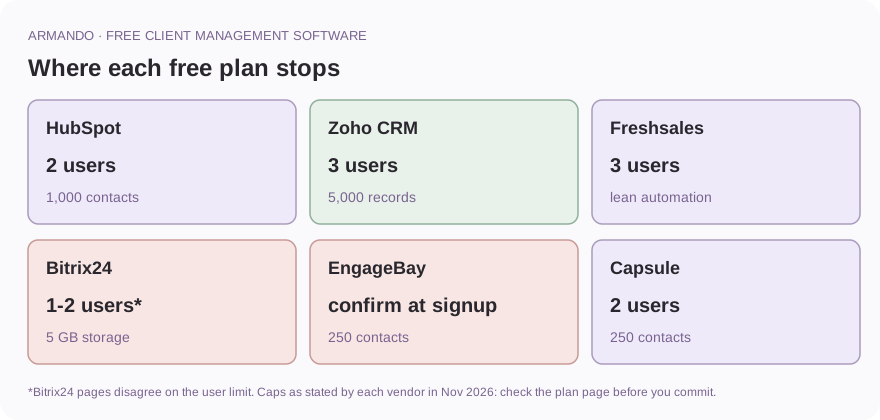
- HubSpot free CRM: 2 users, 1,000 contacts; free forever, with HubSpot branding.
- Zoho CRM free edition: 3 users, 5,000 records, 150 emails per day.
- Freshsales free plan: 3 users with email templates, Kanban views and curated dashboards.
- Bitrix24 free plan: a broad all-in-one suite with 5 GB of storage; its own pages disagree on user limits.
- EngageBay free plan: 250 contacts with CRM, help desk and live chat.
- Capsule free plan: 2 users, 250 contacts, one sales pipeline; lightweight and simple.
- Pocket CRM: a free Android app for solo client tracking on your phone.
Takeaway: every free plan is a trade between price and a cap.
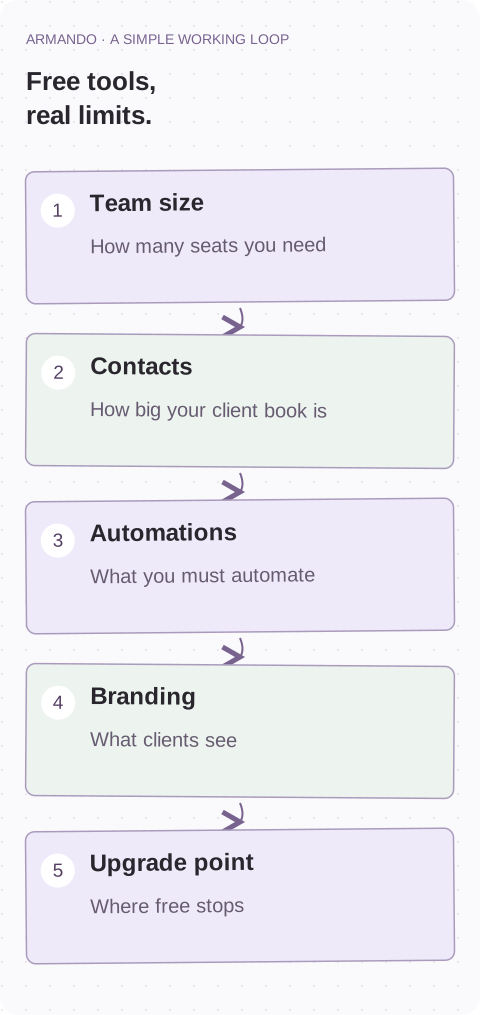
What "free" actually means
Three things get called "free", and they are not the same.
- Free-forever plans. No time limit. You can use the tool at $0 indefinitely, but with caps on users, contacts, storage or features.
- Free trials. Full features for 14 or 30 days, then you pay or lose access. Capsule, for example, runs a 14-day trial of its paid plans alongside a genuinely free plan.
- Freemium caps. Free to start, but the moment you cross a limit, you upgrade. This is where "free" tools earn their money.
The hidden costs are rarely the price tag. They are the workarounds: deleting contacts to stay under a cap, splitting a team across accounts, exporting everything when the free tier stops fitting, or living with vendor branding on every client email. Some free accounts do not even survive you ignoring them. Bitrix24 deletes free accounts after about 50 days of inactivity, and a deleted account cannot be restored.
Takeaway: the real cost of free is the workaround, not the price.
Want help putting this into practice? See how we can help
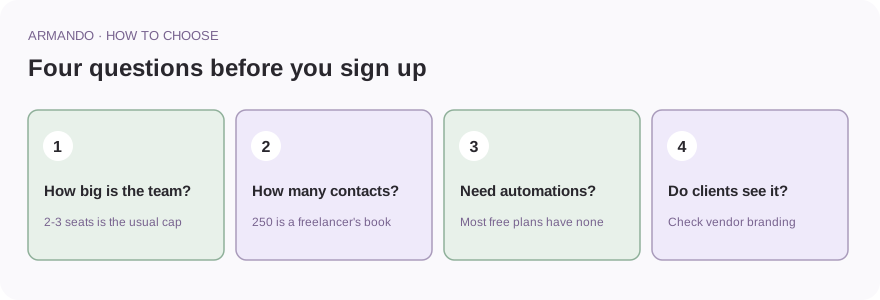
How to choose in four questions
Answer these before you sign up for anything.
- How big is your team? Several free plans stop at 2 or 3 users. If you need 5 seats, your shortlist shrinks fast.
- How many clients and contacts? 250 contacts is a freelancer's book. An agency with 40 clients, 6 stakeholders each and a decade of history is past most free caps.
- Do you need automations? Zoho's free edition includes 5 workflow rules. Most free plans include none.
- Will clients see the tool? Some free plans put the vendor's brand on emails and reports. If clients see it, check that first.
Takeaway: team size and contact count remove most options before you compare features.
Armando: free account-management tools for agencies
If you run an agency or consultancy, your real job is often not sales pipeline management. It is keeping named accounts healthy: knowing who owns the relationship, when the next touchpoint is, and whether revenue is growing or slipping.
Armando is client-management software built for exactly that. Its free tools cover the account-management work that generic CRMs treat as an afterthought.
- Account plans with goals, touchpoints, owners and success measures.
- Stakeholder maps that show relationship gaps across a client account.
- Meeting agendas and follow-up plans, so client calls end with owners and dates.
- Calculators for churn, retention, net revenue retention and client lifetime value.
The honest tradeoff: Armando is not a replacement for a full sales CRM with a shared database of thousands of leads. If you need lead scoring and cold outreach, pick one of the CRM options below. If your problem is that accounts go quiet and nobody noticed until the renewal call, start with Armando's free B2B account-management tools instead.
For a deeper workflow once you pick a tool, see the client account management template and the simple account management system for agencies.
Takeaway: pick Armando when the problem is account health, not lead volume.
Client Account Management Template: A Simple B2B Plan (With Examples) ↗
The simple account management system behind our 110-person agency ↗
HubSpot free CRM
HubSpot still runs one of the most generous free CRMs, but the limits are tighter than older roundups claim. Per HubSpot's pricing page, the free plan includes:
- Up to 2 users.
- Up to 1,000 contacts, with no time limit on the account.
- 1 million records across other standard object types.
You get contact management, deal pipelines, a reporting dashboard, the Breeze AI assistant, and Gmail and Outlook integration. The tradeoff: 2 seats means a third team member pushes you into a paid plan, and free accounts carry HubSpot branding on outbound email. Best for a small team that wants a polished CRM it can grow into.
Takeaway: polished and scalable, but only two seats.
Zoho CRM free edition
Zoho's free edition is free forever for up to 3 users, with 5,000 records across all modules and 1 GB of file storage. Unusually for a free tier, it includes 5 workflow automation rules, webforms for lead capture, email marketing features, reports, and up to 150 emails per day with no Zoho branding on your emails.
The tradeoff: 3 users and 5,000 total records. If your clients, leads and deals together exceed 5,000 rows, you have outgrown the plan. Best for a 3-person team that wants basic automation without paying.
Takeaway: the best free option here for light automation.
Freshsales free plan
Freshsales offers a free plan for up to 3 users. Per Freshworks' support documentation, it includes contact, account and deal management with a Kanban view, sales email templates, curated analytics dashboards and up to 5 custom fields per module.
Freshsales is built around calling and chat, so conversations can log against the contact record instead of living in a separate app. The free plan's phone and chat features are limited compared with paid tiers, so check the pricing comparison page if calls are your main channel. The tradeoff: the free plan is lean on automation and advanced reporting. Best for a small team that talks to clients more than it emails them.
Takeaway: good for phone-first teams, lean on automation.
Bitrix24 free plan
Bitrix24 is the broadest free suite here: CRM with deals and contacts, tasks with Kanban and Gantt views, shared calendars, chat and video calls, a website builder and 5 GB of storage.
One caution: Bitrix24's own pages disagree with each other. Its current pricing page lists the free plan as "for 1-2 users" with 5 GB storage, while the FAQ on that same page still describes unlimited users on the free plan. Treat the user limit as unresolved and check the pricing page before you build a big team on it. The free tier is also a default account state, not a product you choose, so expect paid features to switch off after a trial. And remember the inactivity rule from earlier: stop logging in for about 50 days and the account gets deleted. Best for teams that want many tools in one place and will tolerate rough edges.
Takeaway: broad, but check the user limit and keep logging in.
EngageBay free plan
EngageBay sells an all-in-one suite, and its free plan includes CRM, email marketing basics, a help desk and live chat, capped at 250 contacts.
The 250-contact cap is confirmed on EngageBay's own pricing page, but the user count is messy: EngageBay's homepage advertises a free plan for 15 users while other sources describe smaller seat counts, so confirm the limit at signup. The tradeoff: 250 contacts is the tightest cap on this list, and useful extras like lead scoring and integrations wait for paid plans. Best for a very small team that wants help desk and live chat bundled with its CRM.
Takeaway: a bundle for tiny teams, with the tightest contact cap.
Capsule free plan
Capsule is a deliberately lightweight CRM, and its free plan is free forever for up to 2 users and 250 contacts, with one sales pipeline, 5 custom fields and 50 MB of storage. Contacts get notes, emails and files; deals move through a simple drag-and-drop pipeline. Capsule also runs a 14-day trial of its paid plans with no card required, which is separate from the free plan.
The tradeoff: it is intentionally minimal. Free includes limited reporting, and premium integrations are paid. Best for freelancers and tiny teams who mainly want an organised address book with light deal tracking.
Takeaway: simple on purpose, which is its strength and its limit.
Pocket CRM
Pocket CRM is a free Android app from VividSphere LLP for managing customers and leads entirely from a phone. The store listing describes 360-degree contact views, scheduling with reminders, documents, customisable invoices and proposals, a route planner for field visits and offline access.
The tradeoff: many newer capabilities, including follow-up sequences and pipeline boards, are marked PRO in the app's update notes, and it is Android only. Best for a solo operator or freelancer who works from a phone, not a laptop.
Takeaway: a phone-first tool for one person.
Free-plan comparison at a glance
| Tool | Users | Contacts / records | Notable withheld feature | Best fit |
|---|---|---|---|---|
| Armando | Free tools, no seat gate | Not a contact database | Not a lead-outreach CRM | Agencies and consultancies |
| HubSpot | 2 | 1,000 contacts | Third seat, no branding | Small teams wanting a scalable CRM |
| Zoho | 3 | 5,000 records | More automation rules | 3-person teams |
| Freshsales | 3 | Lean record limits | Advanced reporting | Phone-first small teams |
| Bitrix24 | 1-2 per pricing page | Unlimited deals | Storage (5 GB), paid-only tools | All-in-one seekers |
| EngageBay | Confirm at signup | 250 contacts | Integrations, lead scoring | Tiny teams wanting a help desk |
| Capsule | 2 | 250 contacts | Integrations, reporting | Freelancers, address-book use |
| Pocket CRM | Solo | Phone-stored | PRO features, Android only | Field-based solo operators |
Takeaway: compare the cap, not the logo.
What free client management cannot do
Be honest with yourself about the ceiling.
- Scale. Every free CRM here caps users or contacts. Growth converts free plans into upgrade decisions, often at the worst time.
- Account management depth. A CRM stores contacts and deals. It will not tell you a key account has gone quiet or that two stakeholders hold all the relationship risk. That work needs account plans, stakeholder maps and reviews. If that is your gap, read the guide to choosing agency client communication and reporting tools, and map who matters with a stakeholder map.
- Team coordination. Free tiers often restrict permissions, shared views and roles, which matters once more than one person touches an account.
Upgrading is worth it when you hit a hard cap repeatedly, when automation would save real hours each week, or when lost renewals cost more than a subscription. If the last one sounds familiar, a simple client health score shows which accounts to look at first.
Takeaway: upgrade when the cap or a lost renewal costs more than the plan.
Agency client communication and reporting tools: how to choose ↗
Where the numbers come from
Plan limits were taken from each vendor's own pages in November 2026. They change often, so check the current plan page before you decide.
- HubSpot: hubspot.com/pricing/crm.
- Zoho CRM: zoho.com/crm/free-crm.html.
- Freshsales: Freshworks support article "How to activate the free plan" and freshworks.com/crm/pricing-compare.
- Bitrix24: bitrix24.com/prices and the Bitrix24 help desk article on inactive free accounts.
- EngageBay: engagebay.com/pricing/all-in-one.
- Capsule: capsulecrm.com/signup.
- Pocket CRM: the Google Play store listing.
Takeaway: verify the plan page on the day you sign up.
Common mistakes
Most of these are easy to avoid before you pick a tool.
- Choosing a free plan before counting your users and contacts.
- Mistaking a free trial for a free plan.
- Ignoring vendor branding on client-facing emails.
- Forgetting that inactive free accounts can be deleted.
- Expecting a CRM to do account management.
- Skipping an export before the free tier stops fitting.
Your next step
Count your users, clients and contacts today. Then remove every option above whose cap is lower than your number.
Which one is left? :)
Start with one account this week
- Count your team seats and your contacts.
- Decide if you need a sales pipeline or account management.
- Check if you need automations on day one.
- Check vendor branding on client-facing emails.
- Read the current plan page, not an old roundup.
- Keep logging in, so inactive free accounts are not deleted.
- Export your data before a free tier stops fitting.
- Try Armando's free account-management tools and Brain alongside your CRM.
Common questions
What are the main limitations of free CRM software?
User caps (often 2 to 3 seats), contact or record caps, vendor branding on client-facing email, withheld automations and integrations, and thin reporting. Free accounts can also lapse: Bitrix24 deletes inactive free accounts after about 50 days, with warning emails first.
What is the best free client management software for a small business?
For a small B2B team: HubSpot if you can live with 2 users, Zoho if you need 3 seats and light automation, and Armando if you are an agency whose real need is account management rather than a sales pipeline. Match the cap to your actual team size and contact count.
How is a free plan different from a free trial?
A free plan never expires. A trial gives full features for a limited period, typically 14 days like Capsule's, then either you pay or you lose the extra features. Never assume a tool listed as "free" in a roundup is not just a trial.
Is a free CRM enough for account management?
Usually not on its own. A CRM stores contacts and deals. Account management also needs plans, stakeholder maps, health checks and review meetings, which you can build with simple templates.